John King 500
John N. King

VP / Senior Loan Officer, NMLS# 297957

Address: 10800 Midlothian Turnpike, Suite 206, Richmond, Virginia 23235
O: 804.387.6392
E: jnking@cfmortgagecorp.com

Your Local Industry Expert.

At C&F Mortgage, rest assured we are focused on you. C&F was built on the simple truth that when we pay attention to people and the community, we can make a difference. We are here to guide you on your pathway to home financing from start to finish. Contact us today to learn more about the mortgage process and how we can work together on your journey to home financing.

Customer Reviews

  • Communication was fantastic, always willing to answer my questions, and just staying in touch!
    5.00
    Terri L R .
    September 18, 2025
  • I could call John any time, night, day and weekends and he would answer my call. He called periodically just to check in and see if I had any questions.Read more
    5.00
    Lisa C .
    September 17, 2025
  • We've used John before for home lending needs. He makes the process seamless and pain free . Always a good experience .
    5.00
    Charles W H .
    September 08, 2025
  • is the second time we've used John we have always been satisfied. He's always there to help and answer all of our questions.
    5.00
    Nikki D H .
    August 23, 2025
  • This is the second time John has taken care of a new home mortgage for me, and he does not disappoint! John is always available to answer questions and talkRead more
    5.00
    Carly B .
    July 30, 2025
  • John was great to work with. Answered every wuestion and I would recommend him to anyone looking for a mortgage.
    5.00
    Bradley P D .
    July 18, 2025
  • I wanted to share how grateful we are for John King�s support during our loan process. From the very first call, John was extraordinarily responsive�if we emailed or texted withRead more
    5.00
    Briana B .
    July 18, 2025
  • John was very communicative and always available for questions (and we had many haha!) 10/10 would recommend.
    5.00
    Alaina S .
    July 07, 2025
  • John was great with helping us buy our first home. He was always there to answer any questions and willing to work late at night to get us pre-approved. HeRead more
    5.00
    Monica E S .
    June 12, 2025
  • Friendly but professional accessibility, patience, and effectiveness!
    5.00
    Christpher B .
    May 17, 2025
  • Being a first time home buyer, John never made me feel like my questions were irrelevant. Always attentive, available, communicative. Explained everything in a way that was easy to understand. Never got frustrated with us.
    5.00
    Lindsey L .
    May 09, 2025
  • John has helped me buy multiple homes, including both primary residence and investment property. He is always helpful and knowledgeable, and if he doesn't know something, he'll find out andRead more
    5.00
    Brian M .
    April 24, 2025
  • John has been helpful in all stages of our homebuying experience. He is attentive, responsive, and knowledgeable. Even though we have already bought a home, he has been beyond helpfulRead more
    5.00
    Lauren L .
    April 10, 2025
  • This was my first time purchasing a home. Mr King assisted every step of the way. From the first time I began this process until the end, Mr King madeRead more
    5.00
    9H6Dksdvpx .
    February 15, 2025
  • Mr.King was very upfront and helpful during my purchase of my house. He did so much to help speed the process up. I could not have done it without hisRead more
    5.00
    Nigel F .
    December 27, 2024
  • John was absolutely amazing he was invested in helping me achieve my first home.. the experience was incredible!!! I highly recommend John King to anyone that is purchasing a home.
    5.00
    Vanessa W .
    November 11, 2024
  • I�ve closed on 4 homes with different lenders. John is by far the best person we�ve worked with. We thought we wouldn�t be able to compete with other offers dueRead more
    5.00
    Brian .
    November 11, 2024
  • I reached out to 3 different lenders and John was so much better than the other 2. Throughout the entire process and beyond, John was there. John & his teamRead more
    5.00
    Pburn .
    September 18, 2024
  • John King is a man of integrity and full of knowledge. He is always willing to go the extra mile. He is very professional follow through on his word. YouRead more
    5.00
    Juanita P .
    August 26, 2024
  • John was awesome throughout the whole process, explains everything, responds quickly, checks on you, but doesn�t overdo it! Highly recommend 🙂 thanks again!!
    5.00
    Brooke H .
    August 21, 2024
  • John was so knowledgeable and helpful at every point in the home buying process. He was always available if we had questions and explained everything in a way we understood.Read more
    5.00
    Chris &B .
    August 01, 2024
  • John went above and beyond during my entire loan process! We worked together for a couple of years while I was house searching, and he was always available to answerRead more
    5.00
    Sarah J .
    May 05, 2024
  • John was super knowledgeable and very informative. He was available whenever we needed to get in contact with him. He was very friendly and personable.
    5.00
    Will M .
    May 01, 2024
  • John made himself available to help at all hours of the day and he was very helpful throughout the home buying process. He also reached out after the purchase toRead more
    5.00
    Jamesjeffrey858 .
    January 31, 2024
  • Mr. King was very professional throughout the entire refinance experience. He was knowledgeable about the process and worked diligently to get me the best rate in this current market. HeRead more
    5.00
    T.L .
    March 16, 2023
  • John and his team were the most helpful we have ever encountered. Always responsive to our questions in a timely fashion and on top of our timeline from start toRead more
    5.00
    Reggie/Tasha D .
    February 26, 2023
  • Mr. King's friendship and professionalism were carried throughout the loan process.He responded promptly when I needed assistance to discuss issues or needed clarification. His expertise and ability to work withRead more
    5.00
    Cfbates1 .
    January 07, 2023
  • John is a pro! We have used him in the past and will continue in the future! Kept us well informed every step of the way. I have and would highly recommend to all friends and family!
    5.00
    Nick D .
    October 03, 2022
  • John was very professional and pleasant throughout the transaction. He was accommodating and pushed for us on what was an accelerated timeline. Could not have had a better experience and highly recommend!
    5.00
    Alex P .
    September 27, 2022
  • John was extremely helpful and professional, always friendly and available to talk to whenever I called. He even came to my work when I couldn't come to him. He truly will take care of all your needs.
    5.00
    Laura .
    September 26, 2022
  • John and the rest of the Village Bank team were incredible during the whole process! My home search was delayed after I was initially pre-approved and John kindly followed upRead more
    5.00
    Ben A .
    April 28, 2022
  • John and his team were responsive, easy to deal with, and provided the best rate for my needs. They made sure all my closing documents were completed correctly and in plenty of time. Closing was incredibly easy.
    5.00
    Zuser201707241024122 .
    January 30, 2022
  • John and his team is very professional, reliable. We got closed on a very short date! And John and his team are there to help get what you need, even on weekends! Will definitely recommend him!
    5.00
    Zuser201601040942099 .
    October 04, 2021
  • Our "numbers guy" John was great from application to close. John was readily available to Us and when that wasnt possible he did respond quickly to all forms of communication.Read more
    5.00
    Brittany D .
    September 06, 2021
  • John and his staff were wonderful during our refinancing. Faster than we every thought possible. The communication was far superior than we have had in the past. Everyone on theRead more
    5.00
    Rickathy17 .
    August 23, 2021
  • John helped me through my year long journey to finding my first home! After putting 10 offers in on homes, he was able to close my loan in only 25Read more
    5.00
    Laura R .
    June 14, 2021
  • I have bought and sold a number of homes over 40 years in the Richmond area and this was the easiest process by far. John King and the team atRead more
    5.00
    Julie A M .
    October 30, 2020
  • I'm a first time homebuyer and John was very available for any questions I had as I went through the process. Service was always timely, consistently followed up with me,Read more
    5.00
    Mark .
    September 24, 2020
  • John was absolutely great to work with. He was extremely helpful answering any question you may have anytime time day or night.. He was also very timely and worked hardRead more
    5.00
    Samsonwg .
    April 21, 2020
  • John King was absolutely amazing. He communicated with us throughout the entire process. From beginning to end everything went just as he said it would.
    5.00
    Sara .
    April 14, 2020
  • John was great to work with. Very knowledgeable and answered all my questions. Was always available for a phone call. Helped calculate how much a could afford and helped stay with in that range.
    5.00
    Jwhite8549 .
    April 13, 2020
  • Mr. King was very professional and informative, he explained / helped me every step of the way through my home buying process. When I had a question or concern he told me what I needed to know
    5.00
    Cspearman40 .
    April 01, 2020
  • John King and his team are amazing. Everyone was always available to answer questions and made things seems less intimidating. I have never left a meeting thinking "ok, what justRead more
    5.00
    Whitnee S .
    March 31, 2020
  • John King took what seemed to be impossible and allowed me to own the home of my dreams. The hard work and dedication from him and his team is unmatched.Read more
    5.00
    Jennifer .
    February 13, 2020
  • Working with John was nothing short of a wonderful experience. He answered all of our emails and calls in a timely manner. He took the time to explain our optionsRead more
    5.00
    Erin G .
    January 12, 2020
  • I could not have asked for a better experience than the one I had working with John! As a first time home buyer, there was much about the process thatRead more
    5.00
    Lauren A .
    December 26, 2019
  • Because of Johns work ethic, open communication, and dedication to us, we got the home of our dreams. He made the pre-approval, underwriting, and closing process easy and stress free.Read more
    5.00
    Zuser201508221058124 .
    December 05, 2019
  • He kept us informed along the way, was prompt in responding to emails, was always available, and managed to get us a much lower interest rate than competitors. This teamRead more
    5.00
    Teri A .
    November 20, 2019
  • He was very professional with handling our loan. John worked hard to make sure that he provided me and my husband with adequate and current information regarding our loan processRead more
    5.00
    Brenda D .
    November 07, 2019
  • John King was exceptionally pleasant to work with. Him and his team made the home purchasing process simple. They were always available, ready, and willing to answer all of ourRead more
    5.00
    Parker .
    October 02, 2019
  • Helped me buy my first house. looked out for the best for me and always kept me up to date. Everytime i had a question he would always have anRead more
    5.00
    Simonromero5 .
    July 30, 2019
  • John is professional, yet very easy to talk with, approachable, and available by Email or phone nearly anytime to answer questions. He closed my loan in about 30 days andRead more
    5.00
    Edward H .
    July 21, 2019
  • John helped me and my family close on our house July 1st. He is very knowledgeable about the process and will help you get everything in order and get youRead more
    5.00
    Trice B .
    July 20, 2019
  • John was recommended to us by a friend and we thought he was wonderful. He was always responsive to calls and emails and was always pleasant to work with. BuyingRead more
    5.00
    Gillygwc .
    July 17, 2019
  • We could not have asked for a better experience than we had with John! Not only did he have the best mortgage package available in town, but his level ofRead more
    5.00
    Nathanmkuper .
    May 22, 2019
  • John was a pleasure to work with. He was there when ever I had a question and he went above and beyond to assist me with everything. If I ever need anything else I will use John.
    5.00
    Ross .
    May 22, 2019
  • We�ve worked with John multiple times and we are absolutely in love with. So helpful and attentive at every step. He�s never let us down and continually blows us away.
    5.00
    Matt C .
    May 08, 2019
  • This process was awesome from start to finish. We felt like we were their only customer. I would recommend John and his team to anyone needing a loan, or a financial institution, any day!
    5.00
    Shepcxa .
    May 02, 2019
  • From the very first call to the closing table, John went out of his way to make the process smooth and even enjoyable. "easy" isn't often a work used withRead more
    5.00
    Stacy T E .
    May 01, 2019
  • They were really great to work with and always there when we had any questions or concerns. They were also able to help us out when we had some issues with the process
    5.00
    Logan E .
    March 26, 2019
  • I had previously gone through the re fi process with another lender and it was dysfunctional to say the least. John King (VillageBank) made it very clear and concise as to what exactly was needed no more no less.
    5.00
    Ian L .
    March 26, 2019
  • Highly skilled professional. Provides phenomenal customer service. Handled my VA home Loan in 2015 and my recent Refi - could not be happier with service, accessibility and professionalism.
    5.00
    Jb08Ny .
    March 26, 2019
  • I told John I needed to do a refi. I had an adjustable rate loan that I wanted to refi while the rates were still good. He got on itRead more
    5.00
    Kevin92863 .
    March 11, 2019
  • Mr.King made the first time home buying process easy and smooth. He was very helpful and offered suggestions when I needed them. He even found me a better deal on home owner insurance.
    5.00
    Cmorris4205 .
    December 06, 2018
  • John service were excellent. I contacted John told him exactly what kind of loan I was looking for and what time frame I was looking to close and he madeRead more
    5.00
    Zuser201705081122245 .
    November 18, 2018
  • My wife and I closed on our first home on the last day of October 2018 after much patience. We initially sought John's help in the home-buying process in MarchRead more
    5.00
    Nicole H .
    November 05, 2018
  • I could not give higher praise for John King. He was incredibly helpful at every step for a first time home buyer, always easy to reach and able to answerRead more
    5.00
    Trisha .
    November 04, 2018
  • John was more than happy to answer all of my questions as a first time home buyer. He made the process very easy and helped me to see all ofRead more
    5.00
    Kayla B .
    November 04, 2018
  • We thoroughly enjoyed and appreciated working with John to obtain our first home loan. He seemed to genuinely enjoy helping us understand our options and always had time to answerRead more
    5.00
    P+S=N .
    October 17, 2018
  • Working with John King at Village Bank was refreshingly convenient as well as an overall pleasant experience. John was very knowledgeable and took time to explain different mortgage options. JohnRead more
    5.00
    William W .
    September 13, 2018
  • In my opinion, everything that was requested of me was reasonable to get me qualified. And, their timing has been on point. I felt very comfortable dealing with John.
    5.00
    Cristabelvelez .
    September 11, 2018
  • If there was a ranking system for mortgage consultants, John King would be on the top of the list. If there is a list I am unaware of, I�m sureRead more
    5.00
    Eahilton .
    September 06, 2018

Start here to unlock your

Mortgage Education
Home Financing Process
i
Required Documentation
Who's Involved
Mortgage Calculators
Mortgage Interest Rates
Products and Programs
Credit Education
Budget
After the Loan Closes
Home Financing Process
i
Required Documentation
Who's Involved
Mortgage Calculators
Mortgage Interest Rates
Products and Programs
Credit Education
Budget
After the Loan Closes

Why C&F Mortgage?

Local Industry Expert
We’ve built our reputation as a trusted lender since 1995 by supporting 100,000+ families, closing $21+ billion in loans and earning a 98% customer satisfaction rating.
Innovative Financing Solutions

We provide the best financing options to meet your goals. We’re equipped with the right loan solutions and years of industry expertise to enable us to exceed your expectations.

Focused on You In-Person or Online

Complete your mortgage application digitally via C&F Express or contact us directly — we are here to provide you with our undivided attention.

First-Time Buyer Specialist

Nearly half of our borrowers are buying for the first time. We are committed to helping everyone navigate the homebuying journey.

Helpful

Articles

let’s start your

Home Financing Journey

Have questions or

Need Support?

How do I download the mobile app?

When your loan officer sends you the link to apply for a loan or you click on the apply now link, this is the process to start your loan and how you download the mobile app.

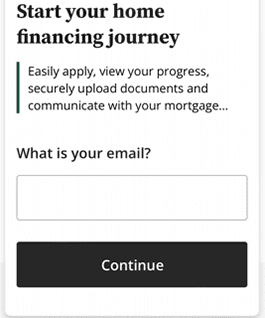
DownloadingApp1

Enter your email address and create a password.

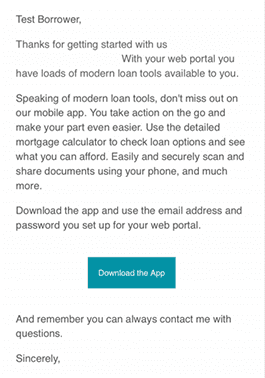
DownloadingApp2

Click on the link in the email you receive to download the app.

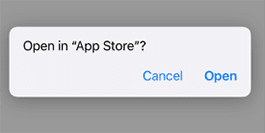
DownloadingApp3

Open the app in app store to download. Download the app.

DownloadingApp4

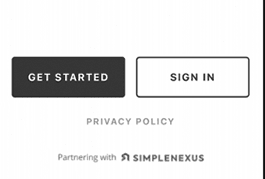
After downloading the mobile app for the first time, getting signed into the app will require a small setup process. After opening up the app, the home screen will display two options: ‘Get Started’ and ‘Sign In.’ Using the ‘Sign In’ button will be used once your username and password has been setup. For first time users, we will want to select the ‘Get Started’ button to create your account profile.

DownloadingApp6

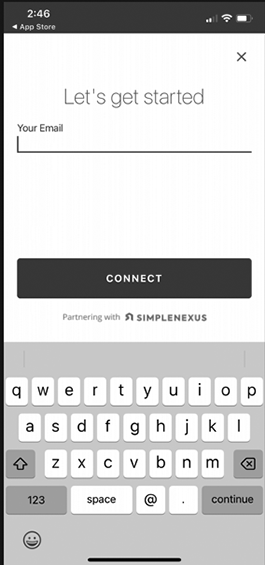
After selecting ‘Get Started’ you will be taken to a screen to enter the email address you would like to use for your account profile. Be sure to check the spelling is correct and then tap on the ‘Connect’ button to proceed. If the email listed is not listed in our system, you will then be asked to provide additional information, such as your name and phone number so that we can save that data for your loan officer’s use.

DownloadingApp7

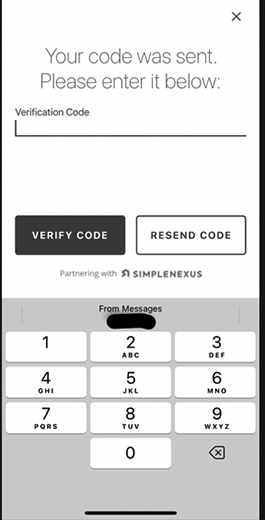
If the email address provided already is recognized in our system, rather than require more information, you will be taken to a page where we will send out a verification code to the email address. The verification code can be sent either by email or text. Select the ‘Send Code’ button to get that code issued out.

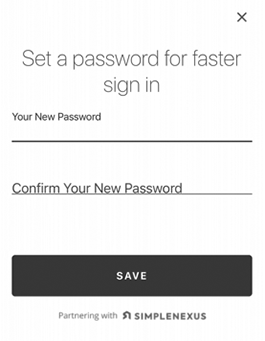
DownloadingApp8

After the account profile has been created and the password set, you will be directed back to the home screen. Tap on the ‘Sign In’ button to proceed with logging into your app.

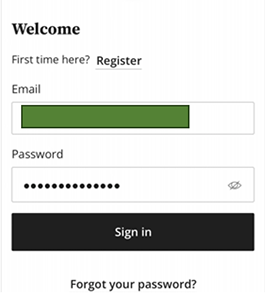
DownloadingApp9

Enter the email address and password in the fields provided, then tap on the ‘Sign In’ button below, which is the login credentials are correct, will take you to the home or ‘Info’ tab of the mobile app where you can then begin to use the app as needed.

What documents do I need to apply?

To provide you with an accurate pre-qualification and process your loan application, we will ask you for a variety of documentation. Please note different programs require varying documentation.

At a bare minimum to complete your initial loan application, you will need the following:

  • 30 days paystubs
  • 2 months bank statements
  • Government issued ID
  • 2 years W-2s

In addition to the list above, if you meet any of the scenarios below we will request additional documentation:

Divorced or Separated:

  • Divorce Decree and/or
  • Separation Agreement

Self-employed:

  • 2 years tax personal tax returns
  • Based on type of self-employment, **may need business tax returns

Social Security Income:

  • 2 years 1099
  • Awards Letter

Receiving a Monetary Gift:

  • Gift Letter
  • Based on Financing type, Gift Documentation will be different

Fully Ratified Sales Contract (Purchase only) once offer is accepted:

  • Fully Ratified Sales Contract

Veteran / VA Loan:

  • DD-214 and/or
  • Statement of Service
How do I provide my bank statements?

As a part of the loan application process, we need the last 2 months of your bank statements for your loan application. There are three ways to upload your bank statements:

  • Automatically syncing your financial institution(s) within the app (ideal scenario)
  • Digital e-statement from your financial institution(s) online banking platform
  • Scanned printed statements from your financial institution(s)

Syncing within the App

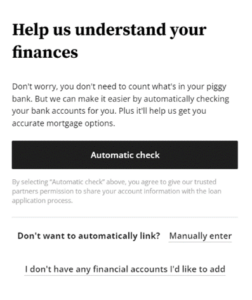
When the question comes up to verify your assets, click on the “Automatic Check” option to continue.

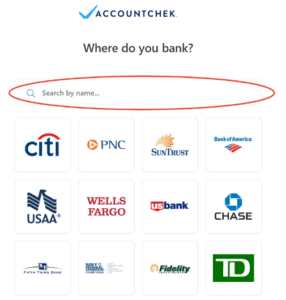
After clicking the Automatic Check button, you will be able to select and/or search your financial institution where your checking, savings, investment and/or retirement accounts are held.

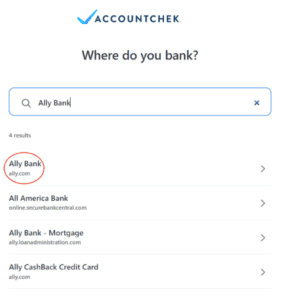
As you type, the search engine will produce a list of close matches. 


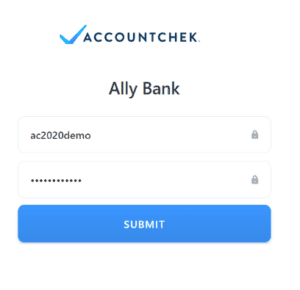
Once the login page is displayed, enter your online banking credentials to sign in. Because your security is our highest priority, your login credentials are never visible to anyone and are encrypted to ensure confidentiality.

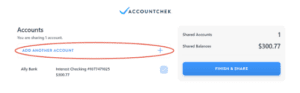
Once AccountChek is authorized to connect to your financial institution, you will be taken to the Review and Submit page. You can click +Add Another Financial Institution to add more accounts while we finish gathering account data.

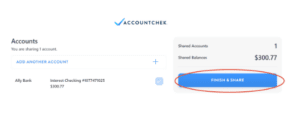
Once you have added all accounts needed to qualify for your loan, please select which accounts you would like to share by checking the checkbox to the right of each account. Once all desired accounts are Linked, click Finish & Share to complete the process! Your lender will notify you if you need to log back in and provide further information.

If you could not connect your financial institution within our automatic portal, you can provide them manually to us in the following ways:

  • Digital e-statement from your financial institution(s) online banking platform
  • Scanned printed statements from your financial institution(s)

Note: We need the actual bank statement with all pages listed, even if the last page is blank. We cannot use screenshots. We need a statement for each bank account you have.

Uploading Digital E-statement

Login to your financial institution’s online platform (preferably on your desktop)

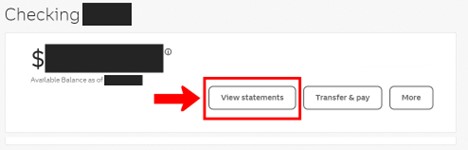
Typically, there should be a section under your account that says “Documents” or “Statements.” Below are two examples of how it might look:

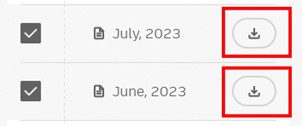
On this page, you should be able to select the statements you would like to download by either a download icon (arrow pointing down) or selecting the check box next to the two months of statements you would like to download. An example of how it might look:

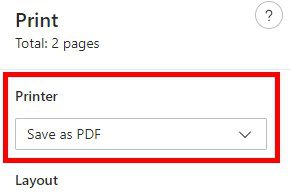
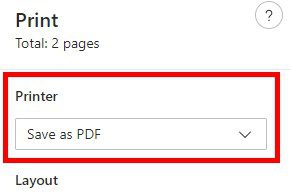
When you click the download button, you will need to save these as a PDF to your computer. To save, you can do so by clicking “Save As” on the initial download or if they open on your computer you can click “File” and then “Save As.” Or, you can click the “Print” icon or “File” and then “Print” then you could change the Printer to “Save to PDF.” Example below:

Finally, login to your Simple Nexus application and upload these documents directly within your portal. Go to the “Documents” tab and upload the PDF.

Scanning Printed Statements:
To scan printed statements, please view the how-to guide below that says “How do I scan documents within the mobile app?”


How do I provide my income documentation?

As the loan application is being filled out, we need 30 days of pay stubs for your loan application.  There are three ways to upload your income documentation:

  • Automatically syncing your payroll provider within the app (ideal scenario)
  • Digital pay stub PDF from your payroll provider
  • Scanned printed pay stub

Syncing within the App

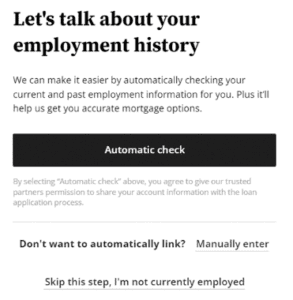
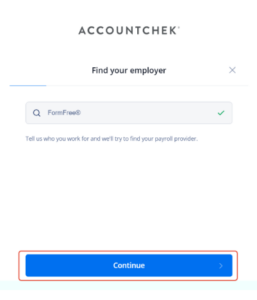
You can connect automatically within our app, or you can opt to manually enter the information.

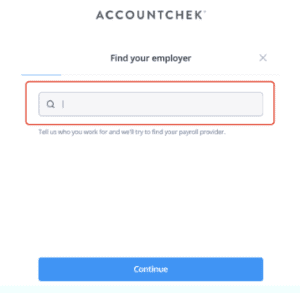
By selecting “Automatic Check” a screen will then load where you will be presented with a search menu. You can search for your employer.

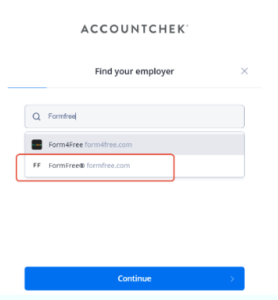
As you type, the search engine will produce a list of close matches. 

Click on your employer’s name and click Continue.

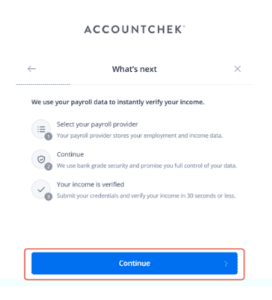
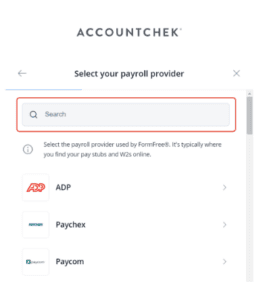
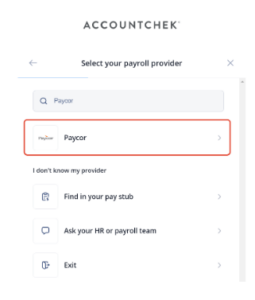
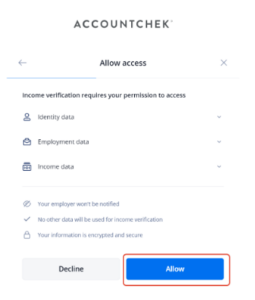
Next you will be asked to select your Payroll Provider. Click on the provider name. After reviewing permissions, click Continue to pull up the login page

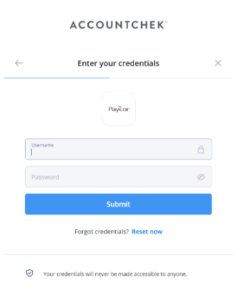
Once the login page is displayed, enter your payroll provider credentials to sign in. Because your security is our highest priority, your login credentials are never visible to anyone and are encrypted to ensure confidentiality. If you do not know your login credentials, use the “reset now” link below the submit button.

If you could not connect your payroll platform within our automatic portal, you can provide the following documentation manually to us:

  • Digital pay stub PDF from your payroll provider
  • Scanned printed pay stub

Note: We need a full 30 days of pay stubs, so if the last two payroll cycles are less than 30 days, please pull an additional pay stub. We need the actual PDF download, we cannot use screenshots.

Uploading Digital Pay stub PDF

Login to your payroll provider offered by your employer, such as ADP or UKG
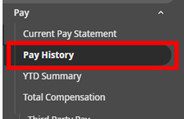
Find your pay statement, typically under “Pay” and “Pay History.” Pay History will allow you to capture more than one pay stub, as we need 30 days. An example of how it might look:

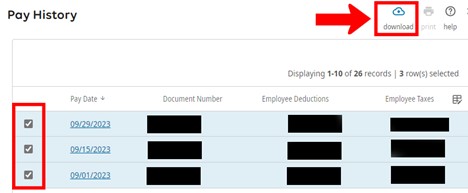
You should either be able to select multiple pay statements and click the download icon (arrow pointing down). Or, click into each individually and click the download icon. An example of how it might look:

When you click the download button, you will need to save these as a PDF to your computer. To save, you can do so by clicking “Save As” on the initial download or if they open on your computer you can click “File” and then “Save As.” Or, you can click the “Print” icon or “File” and then “Print” then you could change the Printer to “Save to PDF.” Example below:

Finally, login to your Simple Nexus application and upload these documents directly within your portal. Go to the “Documents” tab and upload the PDF.


Scanning Printed Pay stub:

To scan printed pay stubs, please view the how-to guide below that says “How do I scan documents within the mobile app?”

 

How do I scan documents within the mobile app?

Uploading required documentation for your mortgage application is necessary to ensure your loan can move forward. This process can be done in one of two ways:

  1. From the web dashboard
  2. From the mobile app

Both options are perfectly fine, but they have unique aspects to it worth mentioning. Uploading a document from a mobile device has you create the document file as you go through the process using our mobile scanner feature, whereas the Web Dashboard will require the documents already be scanned in and saved to the computer being used.

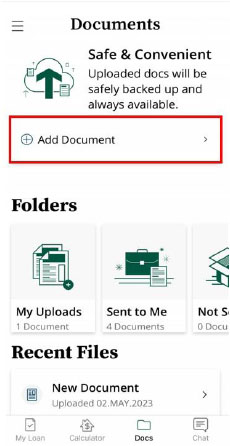
Using the Mobile App, uploading documents starts by selecting the ‘Add Document’ as shown below.

add document

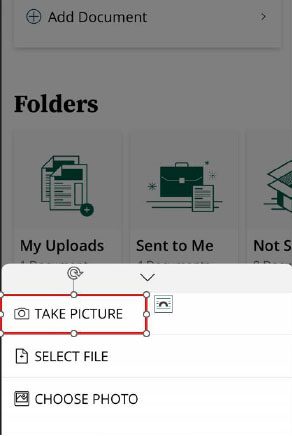
From Add Document, select the option that is needed to make sure you get the document uploaded.

  • Take a Picture – Start the process of getting the document(s) to your
  • Send a File – Select a file on your phone if the document is already on the
  • Drafts & Sent – Resume sending a document that you’ve already started the process with

As we are starting the process, select the ‘Take Picture’ option. (nothing will be saved to your phone)

take picture

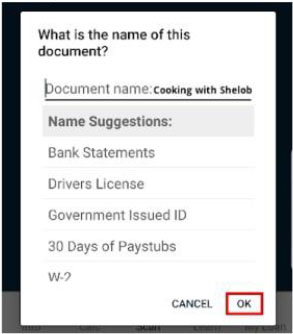
First you will need to name the document you are uploading. There is a list of options already you can select if you find the document name that you are uploading. If you don’t see the title of the document you are uploading, you are able to name it whatever you would like. Once the document name is intact, select ‘OK’ to continue.

click ok

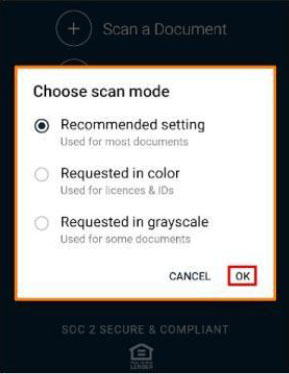
A scan mode option will then be displayed. Most cases, ‘Recommended setting’ works just fine for all documents, but for color documents, such as licenses and IDs, we have a ‘Requested in Color’ option for that. Choose the scan type and click ‘OK.’

scan mode

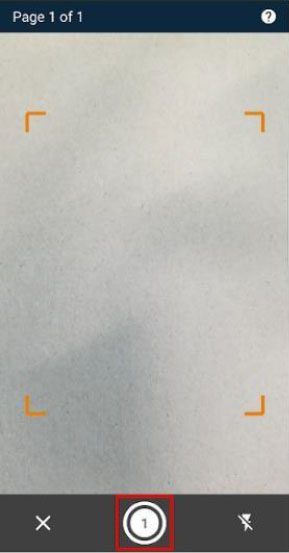
A set of scanning instructions will be shown giving the user tips on how to properly scan the document. Your camera will then turn on letting you take the photo of the document. When you have the document fully lined up properly, select the middle button on the bottom option to take the scan.

scan crop

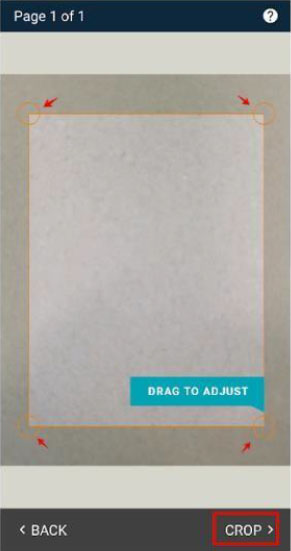
Once the scan is taken, there will be a cropping tool that will let you make any adjustments needed. Once the adjustments are made, select the ‘Crop’ option to continue. If you need to take a scan of the document again though, you are able to click ‘Back’ to retake the scan of the document.

scan crop back

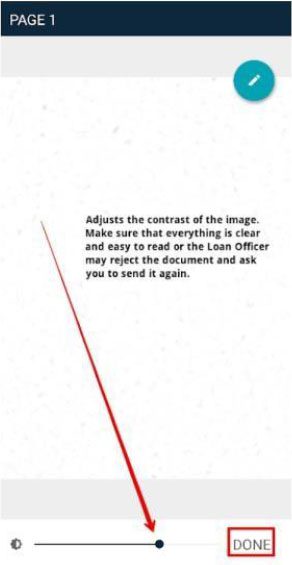
Next will be a contrast adjustment filter to make sure the document is clearly legible. Once you can read it clearly, select ‘Done’ to finalize these edits.

adjust contrast

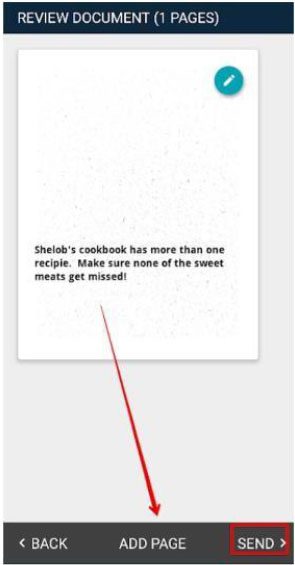
After completing the edits to the scan, there will be a review page where you give a final approval on the document. If the document looks great, you can click ‘Send’ to upload the document to your account profile. If the document has more than one page, you can instead click the ‘Add Page’ option to scan the next page, where you can repeat this process until you have the full document ready to upload.

send

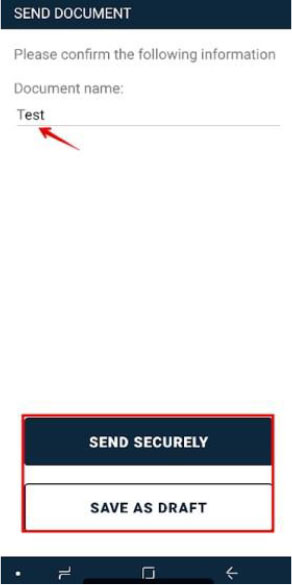
Once you are done, select the ‘Send Securely’ button to upload the document. You will get a confirmation once the document has upload successfully, and you can then close out of the app, or you can instead just click the ‘OK’ button that would appear to go back to the home page of your app.

send securely

Final notes: Scanning your documents in via the app is secure. Also, the scanned documents are not saved on your phone like they would be if you take a picture and send them in via email.

Translate »